RabbitMQ的消费端ACK与重回队列
消费端的手工ACK和NACK
消费端进行消费的时候,如果由于业务异常我们可以进行日志的记录,然后进行补偿.
如果由于服务器宕机等严重问题,那么我们就需要手工进行ACK保障消费端消费成功.
消费端的重回队列
消费端重回队列是为了对没有处理成功的消息,把消息重新传递给Broker.
一般我们在实际应用中,都会关闭重回队列,也就是设置为false.
消费端ACK与重回队列代码演示
消费端自定义监听
import com.rabbitmq.client.AMQP;
import com.rabbitmq.client.Channel;
import com.rabbitmq.client.DefaultConsumer;
import com.rabbitmq.client.Envelope;

import java.io.IOException;

/**
 * @Classname MyConsumer
 * @Description 消费端ACK:自定义客户端监听
 * @Date 2019/9/8 13:15
 * @Created by Jiavg
 */
public class MyConsumer extends DefaultConsumer {

    private Channel channel;

    /**
     * Constructs a new instance and records its association to the passed-in channel.
     * @param channel the channel to which this consumer is attached
     */
    public MyConsumer(Channel channel) {
        super(channel);
        this.channel = channel;
    }

    @Override
    public void handleDelivery(String consumerTag, Envelope envelope, AMQP.BasicProperties properties, byte[] body) throws IOException {
        System.out.println("body:" + new String(body));
        // 延时ack
        try {
            Thread.sleep(10000);
        } catch (InterruptedException e) {
            e.printStackTrace();
        }
        if((Integer)properties.getHeaders().get("num") == 1){
            // basicNack(long deliveryTag, boolean multiple, boolean requeue);
            channel.basicNack(envelope.getDeliveryTag(), false, true);
        }else {
            // basicAck(long deliveryTag, boolean multiple) throws IOException;
            channel.basicAck(envelope.getDeliveryTag(), false);
        }
    }
}
注意:
- 在自定义消费端监听处理消息的handleDelivery()方法中,我们使用Thread.sleep(10000);延时10以
方便我们能够详细的看到消息的消费状况. - 在处理消息中,我们通过判断消息的properties中的headers配置参数中的num来决定此条消息是进行Ack确
认还是进行NAck进行重回队列(requeue设置为true).
消费端实现
import com.rabbitmq.client.Channel;
import com.rabbitmq.client.Connection;
import com.rabbitmq.client.ConnectionFactory;

/**
 * @Classname Consumer
 * @Description 消费端ACK:消费端
 * @Date 2019/9/8 10:48
 * @Created by Jiavg
 */
public class Consumer {

    public static void main(String[] args) throws Exception{

        ConnectionFactory connectionFactory = new ConnectionFactory();
        connectionFactory.setHost("127.0.0.1");
        connectionFactory.setPort(5672);
        connectionFactory.setVirtualHost("/");
        connectionFactory.setUsername("guest");
        connectionFactory.setPassword("guest");

        Connection connection = connectionFactory.newConnection();

        Channel channel = connection.createChannel();

        String exchangeName = "test_Ack_Exchange";
        String routingKey = "Ack.#";
        String queueName = "test_Ack_Queue";

        // 声明交换机、声明队列、绑定队列到交换机
        channel.exchangeDeclare(exchangeName, "topic", true, false, null);
        channel.queueDeclare(queueName, true, false, false, null);
        channel.queueBind(queueName, exchangeName, routingKey);

        // autoAck设置为false
        channel.basicConsume(queueName, false, new MyConsumer(channel));
    }
}
消费端运行-管控台变化
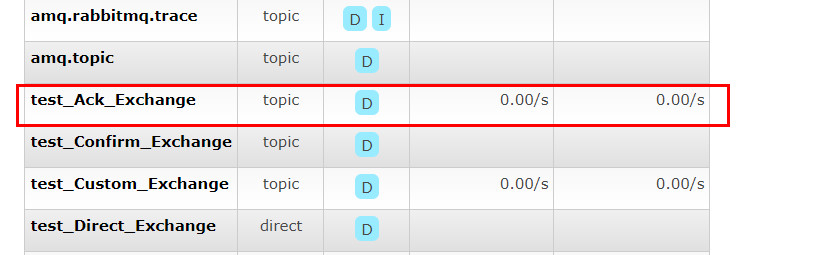
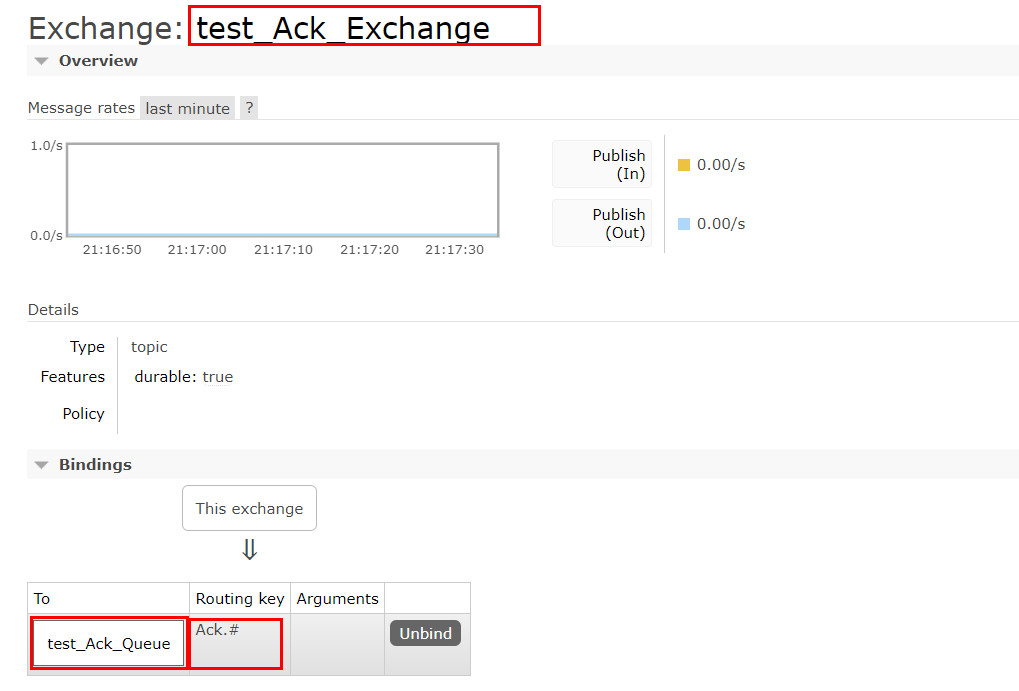
交换机变化
交换机绑定情况
生产端实现
import com.rabbitmq.client.AMQP;
import com.rabbitmq.client.Channel;
import com.rabbitmq.client.Connection;
import com.rabbitmq.client.ConnectionFactory;

import java.util.HashMap;
import java.util.Map;

/**
 * @Classname Producer
 * @Description 消费端ACK:生产者
 * @Date 2019/9/8 10:50
 * @Created by Jiavg
 */
public class Producer {

    public static void main(String[] args) throws Exception{

        ConnectionFactory connectionFactory = new ConnectionFactory();
        connectionFactory.setHost("127.0.0.1");
        connectionFactory.setPort(5672);
        connectionFactory.setVirtualHost("/");
        connectionFactory.setUsername("guest");
        connectionFactory.setPassword("guest");

        Connection connection = connectionFactory.newConnection();

        Channel channel = connection.createChannel();

        String exchangeName = "test_Ack_Exchange";
        String routingKey = "Ack.save";

        for (int i = 0; i < 4; i++){
            String msg = "Hello World send Ack Message:" + i;

            Map<String, Object> headers = new HashMap<>();
            headers.put("num", i);

            AMQP.BasicProperties properties = new AMQP.BasicProperties.Builder()
                    .deliveryMode(2)
                    .contentEncoding("UTF-8")
                    .headers(headers)
                    .build();

            channel.basicPublish(exchangeName, routingKey,true, properties, msg.getBytes());
        }
    }
}
注意:投递模式deliveryMode设置为2,为就是将消息设置为持久化的,此时rabbitmq就会将消息持久化到磁盘
上去(要使此模式生效,相应队列也应设置为持久化).
生产端运行-管控台和控制台变化
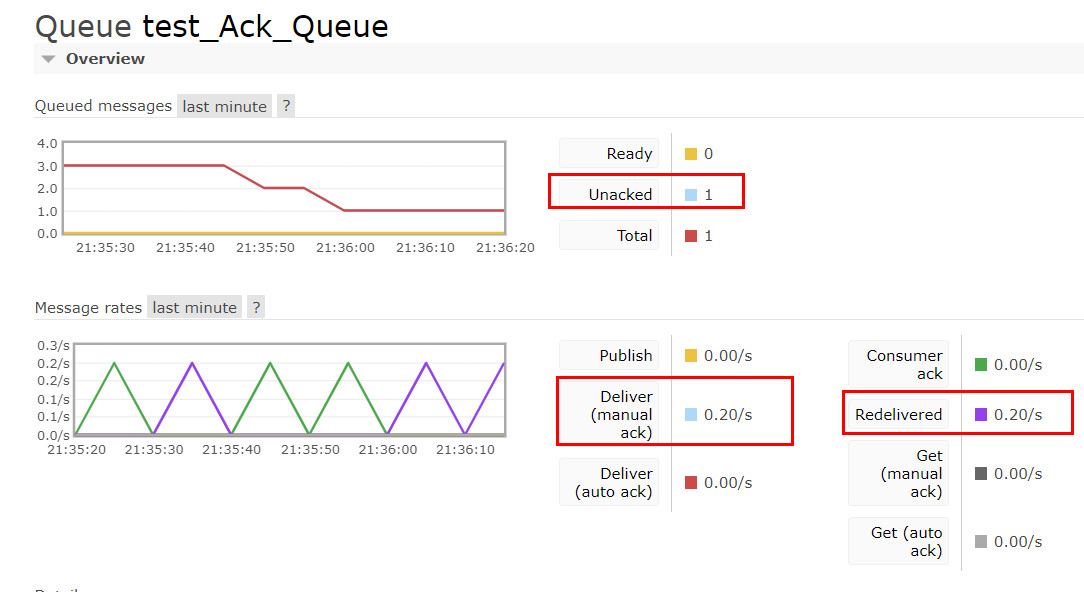
管控台变化
控制台变化
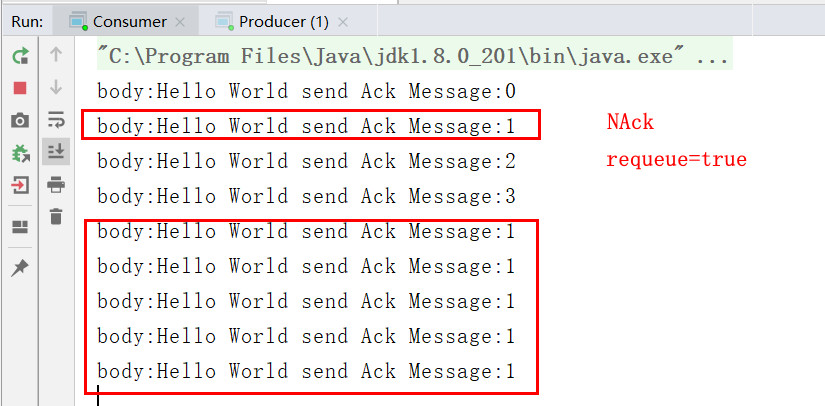
由图结合自定义消费端监听可知,在发送的四条消息中,有一条消息被消费端NAck,故在队列中一直有一条消
息未被ack.并且此条消息由于requeue设置为true,故此条消息被反复重回给队列并被此队列反复投递给此消费
端(由于此队列只绑定了一个消费端).